The w3c/spec-prod GitHub Action lets you:
To get started, do the following:
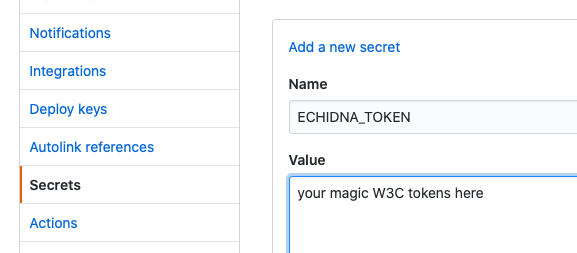
If you want to deploy to W3C /TR:
ECHIDNA_TOKEN
in
the
spec's
repository's
settings.
Create
a
.github/workflows/auto-publish.yml
file
at
the
root
of
the
spec's
repository.
In
the
auto-publish.yml
,
copy-paste
and
modify
one
of
the
examples
below
that
suits
your
needs.
Most
typical
one:
# Inside .github/workflows/auto-publish.yml
name: Automatic Publication
on:
  pull_request: {}
  push:
    branches: [main]
jobs:
  validate-and-publish:
    name: Validate and Publish to TR
    runs-on: ubuntu-latest
    steps:


      - uses: actions/checkout@v6
      - uses: w3c/spec-prod@v2
        with:
          TOOLCHAIN: respec # or bikeshed
          W3C_ECHIDNA_TOKEN: ${{ secrets.ECHIDNA_TOKEN }}
          W3C_WG_DECISION_URL: " See Options for URLs! "
          # Convert Editor's Draft to Working Draft!
          W3C_BUILD_OVERRIDE: |
            specStatus: WD
If
you
do
not
pass
any
inputs,
it
by
default
builds
a
ReSpec
or
Bikeshed
document
(
index.html
or
index.bs
)
and
validates
the
output.
It
does
not
deploy
the
built
document
anywhere.
# Create a file called .github/workflows/auto-publish.yml
name: CI
on:
  pull_request: {}
jobs:
  main:
    name: Build and Validate
    runs-on: ubuntu-latest
    steps:


      - uses: actions/checkout@v6
      - uses: w3c/spec-prod@v2
By default, both markup and Web IDL validators are enabled.
# Create a file called .github/workflows/auto-publish.yml
name: CI
on:
  pull_request: {}
jobs:
  main:
    name: Build and Validate
    runs-on: ubuntu-latest
    steps:


      - uses: actions/checkout@v6
      - uses: w3c/spec-prod@v2
        with:
          VALIDATE_WEBIDL: false
          VALIDATE_MARKUP: true
Specify
TOOLCHAIN
if
the
action
cannot
figure
out
the
toolchain
itself,
or
if
you
like
to
be
explicit.
# Create a file called .github/workflows/auto-publish.yml
name: CI
on:
  pull_request: {}
jobs:
  main:
    name: Build and Validate
    runs-on: ubuntu-latest
    steps:


      - uses: actions/checkout@v6
      - uses: w3c/spec-prod@v2
        with:
          TOOLCHAIN: respec # or bikeshed
Deployment
is
only
done
on
push
events.
In
this
example:
gh-pages
branch,
when
a
commit
is
pushed
to
the
main
branch.
# Create a file called .github/workflows/auto-publish.yml
name: CI
on:
  pull_request: {}
  push:
    branches: [main]
jobs:
  main:
    name: Build, Validate and Deploy
    runs-on: ubuntu-latest
    permissions:
      contents: write
    steps:


      - uses: actions/checkout@v6
      - uses: w3c/spec-prod@v2
        with:
          GH_PAGES_BRANCH: gh-pages
By
default,
output
location
is
mapped
to
the
SOURCE
.
You
can
change
that
by
providing
a
DESTINATION
.
# Create a file called .github/workflows/auto-publish.yml
name: CI
on:
  push:
    branches: [main]
jobs:
  main:
    name: Deploy to GitHub pages
    runs-on: ubuntu-latest
    permissions:
      contents: write
    steps:


      - uses: actions/checkout@v6
      - uses: w3c/spec-prod@v2
        with:
          GH_PAGES_BRANCH: gh-pages
          TOOLCHAIN: bikeshed
          SOURCE: src/spec.bs
          DESTINATION: specification/index.html # `src/spec.html` if not provided.
          # Deployment will be available at: https://<org>.github.io/<repo>/specification/
# Create a file called .github/workflows/auto-publish.yml
name: CI
on:
  pull_request: {}
  push:
    branches: [main]
jobs:
  main:
    name: Build, Validate and Deploy
    runs-on: ubuntu-latest
    steps:


      - uses: actions/checkout@v6
      - uses: w3c/spec-prod@v2
        with:
          W3C_ECHIDNA_TOKEN: ${{ secrets.ECHIDNA_TOKEN }}
          # Replace following with appropriate value. See options.md for details.
          W3C_WG_DECISION_URL: https://lists.w3.org/Archives/Public/public-group/2014JulSep/1234.html
# Example: Override respecConfig for W3C deployment and validators.
name: CI
on:
  pull_request: {}
  push:
    branches: [main]
jobs:
  main:
    name: Build, Validate and Deploy
    runs-on: ubuntu-latest
    steps:


      - uses: actions/checkout@v6
      - uses: w3c/spec-prod@v2
        with:
          TOOLCHAIN: respec
          W3C_ECHIDNA_TOKEN: ${{ secrets.ECHIDNA_TOKEN }}
          W3C_WG_DECISION_URL: https://WG_DECISION_URL_FOR_MY_SPEC.com
          # Publish to w3.org/TR as a Working Draft (WD) under a different shortName.
          W3C_BUILD_OVERRIDE: |
            specStatus: WD
            shortName: my-custom-shortname
See
W3C_BUILD_OVERRIDE
and
GH_PAGES_BUILD_OVERRIDE
for
details.
If you maintain multiple documents in the same repository, you can provide source-destination pairs to build, validate and deploy each one separately.
# Create a file called .github/workflows/auto-publish.yml
name: CI
on:
  pull_request: {}
  push:
    branches: [main]
jobs:
  main:
    name: Build, Validate and Deploy
    runs-on: ubuntu-latest
    permissions:
      contents: write
    strategy:
      max-parallel: 1
      matrix:
        include:
          - source: spec.html
            destination: index.html
            echidna_token: ECHIDNA_TOKEN_SPEC
          - source: spec-1
            destination: the-spec
            echidna_token: ECHIDNA_TOKEN_SPEC1
          - source: spec-2
            # destination defaults to spec-2/index.html
            # echidna_token defaults to no publication to w3.org/TR
    steps:


      - uses: actions/checkout@v6
      - uses: w3c/spec-prod@v2
        with:
          SOURCE: ${{ matrix.source }}
          DESTINATION: ${{ matrix.destination }}
          GH_PAGES_BRANCH: gh-pages
          W3C_ECHIDNA_TOKEN: ${{ secrets[matrix.echidna_token] }}
          W3C_WG_DECISION_URL: "https://lists.w3.org/Archives/Public/xyz.html"
Note:
Echidna
tokens
need
to
be
specified
per
document
but
secrets
cannot
be
directly
evaluated
at
the
matrix
level,
meaning
that
${{
secrets.ECHIDNA_TOKEN_SPEC
}}
cannot
be
evaluated
at
that
level.
As
in
the
above
example,
the
idea
is
rather
to
name
the
token
secret
at
the
matrix
level
(through
echidna_token:
ECHIDNA_TOKEN_SPEC
)
and
to
evaluate
the
secret
in
the
job's
steps
(through
${{
secrets[matrix.echidna_token]
}}
).
Note:
Add
the
max-parallel:
1
setting
as
in
the
example
if
you
run
into
situations
where
jobs
attempt
to
push
updates
to
the
repository
at
the
same
time
and
fail
(see
#58
).
This
setting
makes
GitHub
run
jobs
sequentially.
Note:
At
present,
each
source
might
create
its
own
commit
in
GH_PAGES_BRANCH
even
when
content
of
other
sources
hasn't
changed.
This
is
because
the
build
output
for
each
source
contains
build
date.
Though,
if
you
deploy
multiple
times
in
the
same
day,
the
noise
will
reduce
effectively
as
the
build
date
(hence
the
diff)
hasn't
changed.
The
situation
will
improve
when
#8
and
#14
are
fixed.
As
a
workaround
,
you
can
create
separate
workflows
for
each
document
and
use
GitHub
Actions'
on.<push|pull_request>.paths
as:
# Create a file called .github/workflows/auto-publish-spec-1.yml
name: CI (spec-1)
on:
  pull_request:
    paths: ["spec-1/**"]
  push:
    branches: [main]
    paths: ["spec-1/**"]
jobs:
  main:
    name: Build, Validate and Deploy
    runs-on: ubuntu-latest
    permissions:
      contents: write
    steps:


      - uses: actions/checkout@v6
      - uses: w3c/spec-prod@v2
        with:
          SOURCE: spec-1
          DESTINATION: the-spec
          GH_PAGES_BRANCH: gh-pages
          W3C_ECHIDNA_TOKEN: ${{ secrets.ECHIDNA_TOKEN }}
          W3C_WG_DECISION_URL: "https://lists.w3.org/Archives/Public/xyz.html"
# Create another file called .github/workflows/auto-publish-spec-2.yml
name: CI (spec-2)
on:
  pull_request:
    paths: ["spec-2/**"]
  push:
    branches: [main]
    paths: ["spec-2/**"]
jobs:
  main:
    name: Build, Validate and Deploy
    runs-on: ubuntu-latest
    permissions:
      contents: write
    steps:


      - uses: actions/checkout@v6
      - uses: w3c/spec-prod@v2
        with:
          SOURCE: spec-2/spec.bs
          DESTINATION: spec-2/index.html
          GH_PAGES_BRANCH: gh-pages
          W3C_ECHIDNA_TOKEN: ${{ secrets.ECHIDNA_TOKEN }}
          W3C_WG_DECISION_URL: "https://lists.w3.org/Archives/Public/xyz.html"
Toolchain to use.
Possible
values:
respec
,
bikeshed
.
Default:
None.
Inferred
from
SOURCE
:
respec
if
an
index.html
exists,
or
bikeshed
if
an
index.bs
exists.
Source file path.
Possible values: Any valid POSIX file path relative to repository root.
Default:
None.
Inferred
from
TOOLCHAIN
:
index.html
/
index.bs
if
exists.
Location of generated HTML document and other assets. This is useful when you've multiple specs in same repository.
Possible values: Any valid POSIX file path relative to repository root.
Default:
SOURCE
,
with
file
extension
set
to
.html
.
SOURCE
|
DESTINATION
|
Location of generated spec | Assets copied to directory |
|---|---|---|---|
index.bs
|
None |
./index.html
|
./
|
my-spec/
|
None |
./my-spec/index.html
|
./my-spec/
|
path/to/spec.bs
|
None |
./path/to/spec.html
|
./path/to/
|
my-spec-src
|
my-spec-out
|
./my-spec-out/index.html
|
./my-spec-out/
|
index.html
|
index.html
|
./index.html
|
./
|
Define exit behaviour on build errors or warnings.
Possible
values:
"nothing"
,
"fatal"
,
"link-error"
,
"warning"
,
"everything"
.
BUILD_FAIL_ON
|
Bikeshed | ReSpec |
|---|---|---|
| nothing |
--die-on=nothing
|
Absent. |
| fatal |
--die-on=fatal
|
--haltonerror
(
-e
)
|
| link-error |
--die-on=link-error
|
--haltonerror
(
-e
)
|
| warning |
--die-on=warning
|
--haltonwarn
(
-w
)
|
| everything |
--die-on=everything
|
-e
-w
|
Default:
"fatal"
.
Override Bikeshed metadata or ReSpec config for the GitHub Pages deployment.
Note
that,
you
need
to
use
Bikeshed-specific
metadata
(e.g.
status
)
when
using
Bikeshed,
and
ReSpec-specific
config
(e.g.
specStatus
)
when
using
ReSpec.
Possible values: A string or YAML Literal Block Scalar (multiline string) representing the override config/metadata as key-value pairs. That's mouthful, lets clarify using an example:
# Example: Override Bikeshed metadata for GitHub Pages deployment
- uses: w3c/spec-prod@v2
  with:
    TOOLCHAIN: bikeshed
    GH_PAGES_BUILD_OVERRIDE: |
      status: w3c/WD
      TR: https://www.w3.org/TR/my-cool-spec/
    # Warning: The content in GH_PAGES_BUILD_OVERRIDE might look like YAML key-value pairs, but it's actually a string.
    # GitHub Actions allow only strings as input.
    #
    # Info: Above is same as running Bikeshed CLI like:
    # bikeshed spec INPUT OUTPUT --md-status="w3c/WD" --md-TR="https://www.w3.org/TR/my-cool-spec/"
Default: None.
Override Bikeshed metadata or ReSpec config for the W3C Deployment and validators.
The
Action
will
try
to
make
use
of
metadata/config
from
previously
published
version,
if
available.
For
example,
you
do
not
need
to
manually
provide
respecConfig.previousPublishDate
(or,
Previous
Version
in
case
of
Bikeshed)
when
publishing
to
W3C.
Possible
values:
Same
as
GH_PAGES_BUILD_OVERRIDE
.
Default: None.
# Example: Override respecConfig for W3C deployment and validators.
- uses: w3c/spec-prod@v2
  with:
    TOOLCHAIN: respec
    W3C_BUILD_OVERRIDE: |
      specStatus: WD
      shortName: my-custom-shortname
    # Warning: The content in W3C_BUILD_OVERRIDE might look like YAML key-value pairs, but it's actually a string.
    # GitHub Actions allow only strings as input.
    #
    # Info: Above is equivalent to running ReSpec CLI like:
    # respec -s index.html?specStatus=WD&shortName=my-custom-shortname… -o OUTPUT
Whether or not to validate the markup of the input document using the Nu Html Checker . This option is unlikely to be useful for Bikeshed documents, or for ReSpec documents based on markdown.
Possible values: true, false
Default: false
Whether or not to validate the Web IDL that the spec may define.
Spec authoring tools may already include some level of Web IDL validation but that validation may be restricted to detecting syntax errors. The action also checks additional constraints defined in Web IDL such as usage of dictionaries as function parameters or attributes. The action will automatically skip validation if the spec does not define any Web IDL.
Note that the Web IDL validation is restricted to the spec at hand and cannot validate that references to IDL constructs defined in other specs are valid. As such, there may remain IDL errors that can only be detected by tools that look at all specs in combination such as Webref ).
Possible values: true, false
Default: true
Whether or not to check for broken hyperlinks.
Warning: This feature is experimental.
Possible values: true, false
Default: false
Whether or not to validate markup of the generated document using the Nu Html Checker .
Possible values: true, false
Default: true
Whether or not to validate compliance with W3C Publication Rules using Specberus .
Possible values: true, false
Default: false
Whether
or
not
to
deploy
to
GitHub
pages.
Set
to
a
Falsy
value
to
not
deploy,
or
provide
a
Git
branch
name
to
push
to.
You
would
need
to
enable
GitHub
pages
publish
source
in
repository
settings
manually.
When
this
option
is
set,
you
need
to
ensure
that
the
GITHUB_TOKEN
for
the
job
running
spec-prod
has
write
access
to
the
contents
scope
.
Possible values: : None, or a git branch name.
Default: None
GitHub Personal access token. This field is required only if the default GitHub actions token doesn't have enough permissions, or you want to have more control. Make sure to pass it as a secret .
Possible values: : A valid personal GitHub token.
Default:
GITHUB_TOKEN
The
automated
publication
workflow
requires
a
token
associated
with
the
specification
you
want
to
publish.
Working
Group
Chairs
and
W3C
Team
members
can
request
a
token
directly
from
the
W3C.
This
can
then
be
saved
as
ECHIDNA_TOKEN
in
your
repository
settings
under
"Secrets"
.
Possible values: A valid Echidna token.
Default: None.
A URL to the working group decision to use auto-publish, usually from a w3c mailing list.
Possible values: A non-exhaustive list of possible values:
Default: None.
Comma separated list of email addresses to CC. This field is optional.
Default: None.
Name for artifact which will be uploaded to workflow run. Required to be unique when building multiple documents in same job.
Possible values: Any valid artifact name.
Default:
"spec-prod-result"
or
inferred
from
SOURCE
.