1. Infrastructure
This specification depends on the Infra Standard. [INFRA]
2. Introduction
2.1. Use cases
2.1.1. Web text references
The core use case for text fragments is to allow URLs to serve as an exact text reference across the web. For example, Wikipedia references could link to the exact text they are quoting from a page. Similarly, search engines can serve URLs that direct the user to the answer they are looking for in the page rather than linking to the top of the page.2.1.2. User sharing
With text fragments, browsers may implement an option to 'Copy URL to here' when the user opens the context menu on a text selection. The browser can then generate a URL with the text selection appropriately specified, and the recipient of the URL will have the specified text conveniently indicated. Without text fragments, if a user wants to share a passage of text from a page, they would likely just copy and paste the passage, in which case the receiver loses the context of the page.3. Description
3.1. Indication
This specification intentionally doesn’t define what actions a user agent takes to "indicate" a text match. There are different experiences and trade-offs a user agent could make. Some examples of possible actions:
-
Providing visual emphasis or highlight of the text passage
-
Automatically scrolling the passage into view when the page is navigated
-
Activating a UA’s find-in-page feature on the text passage
-
Providing a "Click to scroll to text passage" notification
-
Providing a notification when the text passage isn’t found in the page
3.2. Syntax
A
text
fragment
directive
is
specified
in
the
fragment
directive
(see
§ 3.3
The
Fragment
Directive
)
with
the
following
format:
#:~:text=[prefix-,]start[,end][,-suffix]
          context  |--match--|  context
(Square brackets indicate an optional parameter)
The text parameters are percent-decoded before matching. Dash (-), ampersand (&), and comma (,) characters in text parameters are percent-encoded to avoid being interpreted as part of the text directive syntax.
The
only
required
parameter
is
start
.
If
only
start
is
specified,
the
first
instance
of
this
exact
text
string
is
the
target
text.
#:~:text=an%20example%20text%20fragment
indicates
that
the
exact
text
"an
example
text
fragment"
is
the
target
text.
If
the
end
parameter
is
also
specified,
then
the
text
directive
refers
to
a
range
of
text
in
the
page.
The
target
text
range
is
the
text
range
starting
at
the
first
instance
of
start
,
until
the
first
instance
of
end
that
appears
after
start
.
This
is
equivalent
to
specifying
the
entire
text
range
in
the
start
parameter,
but
allows
the
URL
to
avoid
being
bloated
with
a
long
text
directive.
#:~:text=an%20example,text%20fragment
indicates
that
the
first
instance
of
"an
example"
until
the
following
first
instance
of
"text
fragment"
is
the
target
text.
3.2.1. Context Terms
The
other
two
optional
parameters
are
context
terms.
They
are
specified
by
the
dash
(-)
character
succeeding
the
prefix
and
preceding
the
suffix,
to
differentiate
them
from
the
start
and
end
parameters,
as
any
combination
of
optional
parameters
can
be
specified.
Context terms are used to disambiguate the target text fragment. The context terms can specify the text immediately before (prefix) and immediately after (suffix) the text fragment, allowing for whitespace.
The context terms are not part of the targeted text fragment and are not visually indicated.
#:~:text=this%20is-,an%20example,-text%20fragment
would
match
to
"an
example"
in
"this
is
an
example
text
fragment",
but
not
match
to
"an
example"
in
"here
is
an
example
text".
3.2.2. BiDi Considerations
Since URL strings are ASCII encoded, they provide no built-in support for bi-directional text. However, the content that we wish to target on a page can be LTR (left-to-right), RTL (right-to-left) or both (Bidirectional/BiDi). This section provides an intuitive description the behavior implicitly described by the normative sections further in this spec.
The characters of each term in the text fragment are in logical order , that is, the order in which a native reader would read them in (and also the order in which characters are stored in memory).
Similarly,
the
prefix
and
start
terms
identify
text
coming
before
another
term
in
logical
order,
while
suffix
and
end
follow
other
terms
in
logical
order.
Note: user agents can visually render URLs in a manner friendlier to a native reader, for example, by converting the displayed string to Unicode. However, the string representation of a URL remains plain ASCII characters.
مِصر
(Egypt,
in
Arabic),
that’s
preceeded
by
البحرين
(Bahrain,
in
Arabic).
We
would
first
percent
encode
each
term:
مِصر
becomes
"%D9%85%D8%B5%D8%B1"
(Note:
UTF-8
character
[0xD9,0x85]
is
the
first
(right-most)
character
of
the
Arabic
word.)
البحرين
becomes
"%D8%A7%D9%84%D8%A8%D8%AD%D8%B1%D9%8A%D9%86"
The text fragment would then become:
:~:text=%D8%A7%D9%84%D8%A8%D8%AD%D8%B1%D9%8A%D9%86-,%D9%85%D8%B5%D8%B1
When displayed in a browser’s address bar, the browser can visually render the text in its natural RTL direction, appearing to the user:
:~:text=البحرين-,مِصر
3.3. The Fragment Directive
To
avoid
compatibility
issues
with
usage
of
existing
URL
fragments,
this
spec
introduces
the
fragment
directive
.
The
concept
of
a
fragment
directive
.
It
is
a
the
portion
of
the
URL
fragment
that
follows
the
fragment
directive
delimiter
.
and
may
be
null
if
the
delimiter
does
not
appear
in
the
fragment.
The fragment directive delimiter is the string ":~:", that is the three consecutive code points U+003A (:), U+007E (~), U+003A (:).
The
fragment
directive
is
meant
parsed
and
processed
into
individual
directives
,
which
are
instructions
to
carry
instructions,
such
as
text=
,
for
the
UA
rather
than
for
user
agent
to
perform
some
action.
Multiple
directives
may
appear
in
the
document.
fragment
directive.
https://example.com#:~:text=foo&text=bar&unknownDirective
Contains 2 text directives and one unknown directive.
To
prevent
impacting
page
operation,
it
is
stripped
from
a
Document
's
URL
so
that
author
scripts
can’t
directly
interact
to
prevent
interaction
with
it.
author
script.
This
also
ensures
future
directives
could
can
be
added
without
introducing
breaking
changes
to
existing
content.
Potential
examples
could
be:
image-fragments,
translation-hints.
web
compatibility
risk.
3.3.1. Processing the fragment directive
The fragment directive is processed and removed from the fragment whenever the UA sets the URL on a Document . This is defined with the following additions and changes.
To the definition of Document , add:
Monkeypatching [DOM] :
Each document has an associated fragment directive which is either null or an ASCII string holding data used by the UA to process the resource. It is initially null.
fragment
and
a
fragment
directive
(both
ASCII
strings),
run
these
steps:
-
Let position be the position variable pointing to the first code point of the first instance, if one exists, of the fragment directive delimiter in raw fragment , or past the end of raw fragment otherwise.
-
Let fragment be the code point substring by positions of raw fragment from the start of raw fragment to position .
-
Let fragmentDirective be an ASCII string, initially empty.
-
Advance position by the code point length of the fragment directive delimiter .
-
If position does not point past the end of raw fragment :
-
Set fragmentDirective to the code point substring to the end of the string raw fragment starting from position
-
-
Return the tuple ( fragment , fragmentDirective ).
Whenever
the
fragment
directive
is
stripped
from
the
URL,
it
the
Document’s
fragment
directive
is
set
to
the
Document’s
content
of
the
fragment
directive
.
directive.
Add a series of steps that will process a fragment directive on a URL :
Monkeypatching [DOM] :
To process and consume fragment directive from a URL url and Document document , run these steps:
Let raw fragment be equal to url ’s fragment .
If raw fragment is non-null and contains the fragment directive delimiter as a substring:
Let components be the result of running split the fragment from the fragment directive on raw fragment .
Set url ’s fragment to components ’
fragment.Set document ’s fragment directive to components ’
fragment directive.This is stored on the document but currently not web-exposed
https://example.org/#test:~:text=foo
will
be
parsed
such
that
the
fragment
is
the
string
"test"
and
the
fragment
directive
is
the
string
"text=foo".
Amend the create and initialize a Document object steps to parse and remove the fragment directive by inserting the following steps right before the setting document ’s URL ( currently step 9):
Monkeypatching [HTML] :
Run the process and consume fragment directive steps on creationURL and document .
Set document ’s URL to be creationURL .
Amend the traverse the history steps to process the fragment directive during a history navigation by inserting steps before setting the newDocument ’s URL ( currently step 6).
Monkeypatching [HTML] :
Let processedURL be a copy of entry ’s URL.
Run the process and consume fragment directive steps on processedURL and document .
Set newDocument ’s URL to processedURL .
The
changes
in
this
section
imply
that
a
URL
is
only
stripped
of
its
fragment
directive
when
it
is
set
on
a
Document.
Notably,
since
a
window’s
Location
object
is
a
representation
of
the
URL
of
the
active
document
,
all
getters
on
it
will
show
a
fragment-directive-stripped
version
of
the
URL.
Some examples are provided to help clarify various edge cases.
window.location = 'https://example.com#foo:~:bar';
The page loads and when the document’s URL is set the fragment directive is stripped out during the "create and initialize a Document object" steps.
console.log(window.location.href); // 'https://example.com#foo'
console.log(window.location.hash); // '#foo'
Since same document navigations are made by adding a new session history entry and using the "traverse the history" steps, the the fragment directive will be stripped here as well.
window.location.hash = 'fizz:~:buzz';
console.log(window.location.href); // 'https://example.com#fizz'
console.log(window.location.hash); // '#fizz'
The hashchange event is dispatched when only the fragment directive changes because the comparison for it is done on the URLs in the session history entries, where the fragment directive hasn’t been removed.
onhashchange = () => {console.log('HASHCHANGE');};
window.location.hash = 'fizz:~:zillch'; // 'HASHCHANGE'
console.log(window.location.href); // 'https://example.com#fizz'
console.log(window.location.hash); // '#fizz'
For URL objects:
let url = new URL('https://example.com#foo:~:bar');
console.log(url.href); // 'https://example.com#foo:~:bar'
console.log(url.hash); // '#foo:~:bar'
document.url = url;
console.log(document.url.href); // 'https://example.com#foo:~:bar'
console.log(document.url.hash); // '#foo:~:bar'
The
<a>
or
<area>
elements:
<a id='anchor' href="https://example.com#foo:~:bar">Anchor</a>
<script>
  console.log(anchor.href); // 'https://example.com#foo:~:bar'
  console.log(anchor.hash); // '#foo:~:bar'
</script>
history.pushState({}, 'title', 'index.html#foo:~:bar');
window.location = 'newpage.html';
// on newpage.html
history.back();
Results in the current document having "bar" as the fragment directive.
3.3.2. Parsing the fragment directive
A text directive is a kind of directive representing a range of text to be indicated to the user. It is a struct that consists of four strings: start , end , prefix , and suffix . start is required to be non-null. The other three items may be set to null, indicating they weren’t provided. The empty string is not a valid value for any of these items.
See § 3.2 Syntax for the what each of these components means and how they’re used.
To parse a text directive , on an ASCII string text directive input , run these steps:
This algorithm takes a single text directive string as input (e.g. "text=prefix-,foo,bar") and attempts to parse the string into the components of the directive (e.g. ("prefix", "foo", "bar", null)). See § 3.2 Syntax for the what each of these components means and how they’re used.
Returns null if the input is invalid or fails to parse in any way. Otherwise, returns a text directive .
-
Assert : text directive input matches the production TextDirective .
-
Let textDirectiveString be the substring of text directive input starting at index 5.
This is the remainder of the text directive input following, but not including, the "text=" prefix. -
Let tokens be a list of strings that is the result of splitting textDirectiveString on commas .
-
If tokens has size less than 1 or greater than 4, return null.
-
If any of tokens ’s items are the empty string, return null.
-
Let retVal be a text directive with each of its items initialized to null.
-
Let potential prefix be the first item of tokens .
-
If the last character of potential prefix is U+002D (-), then:
-
Set retVal ’s prefix to the percent-decoding of the result of removing the last character from potential prefix .
-
Remove the first item of the list tokens .
-
-
Let potential suffix be the last item of tokens , if one exists, null otherwise.
-
If potential suffix is non-null and its first character is U+002D (-), then:
-
Set retVal ’s suffix to the percent-decoding of the result of removing the first character from potential suffix .
-
Remove the last item of the list tokens .
-
-
If tokens has size not equal to 1 nor 2 then return null.
-
Set retVal ’s start be the percent-decoding of the first item of tokens .
-
If tokens has size 2, then set retVal ’s end be the percent-decoding of the last item of tokens .
-
Return retVal .
3.3.3. Fragment directive grammar
A
An
ASCII
string
is
a
valid
fragment
directive
is
a
sequence
of
characters
that
appears
in
the
fragment
directive
that
if
it
matches
the
production:
-
FragmentDirective::= -
( TextDirective | UnknownDirective ) ("&" FragmentDirective )? -
UnknownDirective::= -
CharacterString -
CharacterString::= -
( ExplicitChar | PercentEncodedChar )+ -
ExplicitChar::= -
[a-zA-Z0-9]
|
"!"
|
"$"
|
"'"
|
"("
|
")"
|
"*"
|
"+"
|
"."
|
"/"
|
":"
|
";"
|
"="
|
"?"
|
"@"
|
"_"
|
"~"
|
","
|
"-"
An ExplicitChar may be any URL code point other than "&".
-
TextDirective::= -
"text=" TextDirectiveParameters -
TextDirectiveParameters::= -
( TextDirectivePrefix ",")? TextDirectiveString ("," TextDirectiveString )? ("," TextDirectiveSuffix )? -
TextDirectivePrefix::= -
TextDirectiveString "-" -
TextDirectiveSuffix::= -
"-" TextDirectiveString -
TextDirectiveString::= -
( TextDirectiveExplicitChar | PercentEncodedChar )+ -
TextDirectiveExplicitChar::= -
[a-zA-Z0-9]
|
"!"
|
"$"
|
"'"
|
"("
|
")"
|
"*"
|
"+"
|
"."
|
"/"
|
":"
|
";"
|
"="
|
"?"
|
"@"
|
"_"
|
"~"
A TextDirectiveExplicitChar is any URL code point that is not explicitly used in the TextDirective syntax, that is "&", "-", and ",". If a text fragment refers to a "&", "-", or "," character in the document, it will be percent-encoded in the fragment. -
PercentEncodedChar::= -
"%"
[a-zA-Z0-9]+
3.4. Security and Privacy
3.4.1. Motivation
Care
must
be
taken
when
implementing
text
fragment
directive
so
that
it
cannot
be
used
to
exfiltrate
information
across
origins.
Scripts
can
navigate
a
page
to
a
cross-origin
URL
with
a
text
fragment
directive
.
If
a
malicious
actor
can
determine
that
the
text
fragment
was
successfully
found
in
victim
page
as
a
result
of
such
a
navigation,
they
can
infer
the
existence
of
any
text
on
the
page.
The
following
subsections
restrict
the
feature
to
mitigate
the
expected
attack
vectors.
In
summary,
the
text
fragment
directives
are
invoked
only
on
full
(non-same-page)
navigations
that
are
the
result
of
a
user
activation.
Additionally,
navigations
originating
from
a
different
origin
than
the
destination
will
require
the
navigation
to
take
place
in
a
"noopener"
context,
such
that
the
destination
page
is
known
to
be
sufficiently
isolated.
3.4.2. Scroll On Navigation
A UA may choose to automatically scroll a matched text passage into view. This can be a convenient experience for the user but does present some risks that implementing UAs need to be aware of.
There are known (and potentially unknown) ways a scroll on navigation might be detectable and distinguished from natural user scrolls.
All known cases like this rely on specific circumstances about the target page so don’t apply generally. With additional restrictions about when the text fragment can invoke an attacker is further restricted. Nonetheless, different UAs can come to different conclusions about whether these risks are acceptable. UAs need to consider these factors when determining whether to scroll as part of navigating to a text fragment.
Conforming UAs may choose not to scroll automatically on navigation. Such UAs may, instead, provide UI to initiate the scroll ("click to scroll") or none at all. In these cases UA should provide some indication to the user that an indicated passage exists further down on the page.
The examples above illustrate that in specific circumstances, it can be possible for an attacker to extract 1 bit of information about content on the page. However, care must be taken so that such opportunities cannot be exploited to extract arbitrary content from the page by repeating the attack. For this reason, restrictions based on user activation and browsing context isolation are very important and must be implemented.
However, it also ensures any malicious use is difficult to hide. A browsing context that’s the only one in a group will be a top level browsing context (i.e. a full tab/window).
If a UA does choose to scroll automatically, it must ensure no scrolling is performed while the document is in the background (for example, in an inactive tab). This ensures any malicious usage is visible to the user and prevents attackers from trying to secretly automate a search in background documents.
If a UA chooses not to scroll automatically, it must scroll a fallback element-id into view, if provided, regardless of whether a text fragment was matched. Not doing so would allow detecting the text fragment match based on whether the element-id was scrolled.
3.4.3. Search Timing
A
naive
implementation
of
the
text
search
algorithm
could
allow
information
exfiltration
based
on
runtime
duration
differences
between
a
matching
and
non-
matching
query.
If
an
attacker
could
find
a
way
to
synchronously
navigate
to
a
text
fragment
directive
-invoking
URL,
they
would
be
able
to
determine
the
existence
of
a
text
snippet
by
measuring
how
long
the
navigation
call
takes.
For this reason, the implementation must ensure the runtime of § 3.5 Navigating to a Text Fragment steps does not differ based on whether a match has been successfully found .
This specification does not specify exactly how a UA achieves this as there are multiple solutions with differing tradeoffs. For example, a UA may continue to walk the tree even after a match is found in find a range from a text directive . Alternatively, it may schedule an asynchronous task to find and set the Document 's indicated part.
3.4.4. Restricting the Text Fragment
Amend
the
definition
of
a
request
and
of
a
Document
to
include
a
new
boolean
text
fragment
directive
user
activation
field:
Monkeypatching [FETCH] :
A request has an associated boolean text
fragmentdirective user activation , initially false.
Monkeypatching [HTML] :
Each Document has a text
fragmentdirective user activation , which is a boolean, initially false.textfragmentdirective user activation provides the necessary user gesture signal to allow a single activation of a text fragment. It is set to true during document loading only if the navigation occurred as a result of a user activation and is propagated across client-side redirects.If a Document 's text
fragmentdirective user activation isn’t used to activate a text fragment, it is instead used to set a new navigation request 's textfragmentdirective user activation to true. In this way, a textfragmentdirective user activation can be propagated from one Document to another across a navigation.Both Document 's text
fragmentdirective user activation and request 's textfragmentdirective user activation are always set to false when used, such that a single user activation cannot be reused to activate more than one text fragment.
This mechanism allows text fragments to activate through a common redirect technique used by many popular web sites. Such sites redirect users to their intended destination by responding with a 200 status code containing script to set the window.location .
Unlike
real
HTTP
(
status
3xx
)
redirects,
these
"client-side"
redirects
cannot
propagate
the
fact
that
the
navigation
is
the
result
of
a
user
gesture.
The
text
fragment
directive
user
activation
mechanism
allows
passing
through
this
specifically
scoped
user-activation
through
such
navigations.
This
means
a
page
is
able
to
programmatically
navigate
to
a
text
fragment,
a
single
time,
as
if
it
has
a
user
gesture.
However,
since
this
resets
text
fragment
user
activation
,
further
text
fragment
navigations
will
not
activation
without
a
new
user
gesture.
The following diagram demonstrates how the flag is used to activate a text fragment through a client-side redirect service:
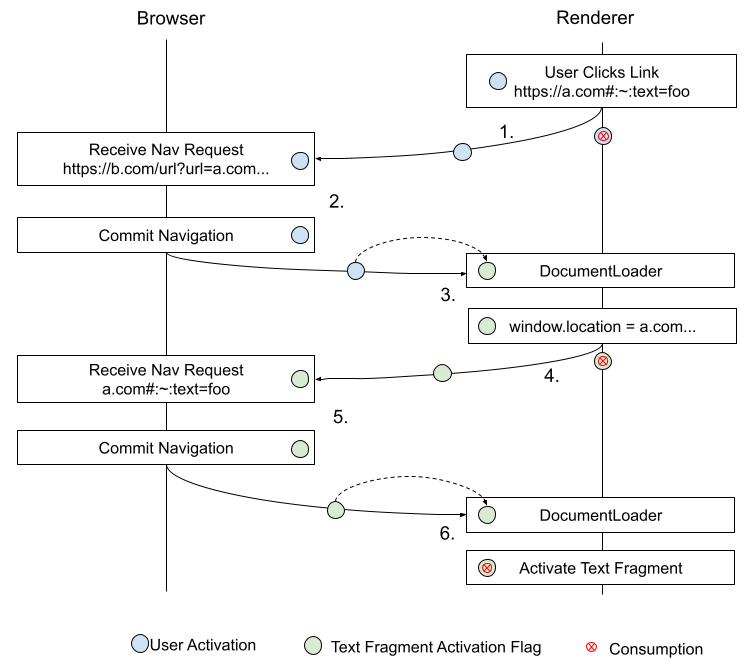
See redirects.md for a more in-depth discussion.
Monkeypatching [HTML] :
Each Document has an allow text fragment scroll , which is a boolean, initially false.
allow text fragment scroll is used to determine whether a text fragment will perform scrolling when the document is loaded. If it is false, the text fragment can be visually indicated but will not be scrolled to. This implements the mitigations discussed in § 3.4.2 Scroll On Navigation .
The reason we compute and store allow text fragment scroll, rather than performing these checks at the time of use, is that it relies on the properties of the navigation while the invocation will occur as part of the scroll to the fragment steps which can happen outside the context of a navigation.
Amend the create and initialize a Document object steps by adding the following steps before returning document :
Monkeypatching [HTML] :
Set document ’s text
fragmentdirective user activation by following these sub-steps:
Let is user activated be true if the current navigation was initiated from a window that had a transient activation at the time the navigation was initiated, or the UA has reason to believe it comes from a direct user gesture (e.g. user typed into the address bar).
TODO: it’d be better to refer to the user-activation flag.If browsing context is a top-level browsing context and if either of is user activated or the text
fragmentdirective user activation of navigationParam ’s request object is true, set the document ’s textfragmentdirective user activation to true. Otherwise, set it to false.It’s important that the flag not be copyable so that only one text fragment can be activated per user-activated navigation.Set document ’s allow text fragment scroll by following these sub-steps:
If document ’s fragment directive field is null or empty, set allow text fragment scroll to false and abort these sub-steps.
Let text
fragmentdirective user activation be the value of document ’s textfragmentdirective user activation and set document ’s textfragmentdirective user activation to false.If the navigationParam ’s request has a sec-fetch-site header and its value is
"none"set allow text fragment scroll to true and abort these sub-steps.If a navigation originates from browser UI, it’s always ok to allow it since it’ll be user triggered and the page/script isn’t providing the text snippet.
Note: Depending on the UA, there can be cases where the incumbentNavigationOrigin parameter is null but it’s not clear that the navigation is to be considered as initiated from browser UI. E.g. an "open in new window" context menu item when right clicking on a link. The intent in this item is to distinguish cases where the app/page is able to set the URL from those that are fully under the user’s control. In the former we want to prevent activation of the text fragment unless the destination is loaded in a separate browsing context group (so that the source cannot both control the text snippet and observe side-effects in the navigation).
See sec-fetch-site in [FETCH-METADATA] for a more detailed discussion of how this applies.
If text
fragmentdirective user activation is false, set allow text fragment scroll to false and abort these sub-steps.If the navigationParam ’s request has a sec-fetch-site header and its value is
"same-origin"set allow text fragment scroll to true and abort these sub-steps.If document ’s browsing context is a top-level browsing context and its group ’s browsing context set has length 1, set allow text fragment scroll to true and abort these sub-steps.
i.e. Only allow navigation from a cross-origin element/script if the document is loaded in a noopener context. That is, a new top level browsing context group to which the navigator does not have script access and which can be placed into a separate process.Otherwise, set allow text fragment scroll to false.
Amend
step
2
of
the
process
a
navigate
fetch
steps
to
additionally
set
request
’s
text
fragment
directive
user
activation
to
the
value
of
the
active
document
's
text
fragment
directive
user
activation
and
set
the
active
document
's
value
to
false.
Monkeypatching [HTML] :
Set request’s client to sourceBrowsingContext’s active document’s relevant settings object, destination to "document", mode to "navigate", credentials mode to "include", use-URL-credentials flag, redirect mode to "manual", replaces client id to browsingContext’s active document’s relevant settings object’s id, and text
fragmentdirective user activation to sourceBrowsingContext’s active document’s textfragmentdirective user activation . Set sourceBrowsingContext’s active document’s textfragmentdirective user activation to false.
Amend the try to scroll to the fragment steps by replacing the steps of the task queued in step 2:
Monkeypatching [HTML] :
If document has no parser, or its parser has stopped parsing, or the user agent has reason to believe the user is no longer interested in scrolling to the fragment, then set document ’s allow text fragment scroll to false and abort these steps.
Scroll to the fragment given in document’s URL. If this does not find an indicated part, then try to scroll to the fragment for document.
Set document ’s allow text fragment scroll to false.
3.5. Navigating to a Text Fragment
To enable the scroll to the fragment algorithm to operate on a range indicated part, replace step 3 of this algorithm as follows:
Monkeypatching [HTML] :
Replace:
Assert: document’s indicated part is an element.Let target be document’s indicated part.Set document’s target element to target.Run the ancestor details revealing algorithm on target.Run the ancestor hidden-until-found revealing algorithm on target.Scroll target into view, with behavior set to "auto", block set to "start", and inline set to "nearest".Run the focusing steps for target, with the Document’s viewport as the fallback target.Move the sequential focus navigation starting point to target.With:
Assert: document’s indicated part is a range .
Let range be the range that is document ’s indicated part .
Let target be the first common ancestor of range ’s start node and end node .
While target is non-null and is not an element , set target to target ’s parent .
What should be set as target if inside a shadow tree? #190Set document ’s target element to target .
Run the ancestor details revealing algorithm on target.
Run the ancestor hidden-until-found revealing algorithm on target.
These revealing algorithms currently wont work well since target could be an ancestor or even the root document node. Issue #89 proposes restricting matches tocontain:style layoutblocks which would resolve this problem.Get the policy value for
force-load-at-topin the Document . If the result is false:
If range wasn’t produced as a result of a text fragment, or if the UA supports scrolling of text fragments on navigation, invoke scroll a target into view , with target set to range , containingElement target , behavior set to "auto", block set to "center", and inline set to "nearest".
Let start node be range ’s start node .
Run the focusing steps for start node , with the Document’s viewport as the fallback target.
Move the sequential focus navigation starting point to start node .
To enable a fragment to indicate a range of text, add the following steps to the beginning of the processing model for the HTML Document 's indicated part so that the indicated part is a range :
Monkeypatching [HTML] :
Let fragment directive string be the document’s fragment directive .
If the document’s allow text fragment scroll is true then:
Let ranges be a list that is the result of running the process a fragment directive steps with fragment directive string and the document.
If ranges is non-empty, then:
Let range be the first item of ranges .
Set range as document ’s indicated part, return.
In order for the indicated part to return a range for regular element fragments, modify the find a potential indicated element steps as follows:
Monkeypatching [HTML] :
Replace:
If there is an element in the document tree whose root is document and that has an ID equal to fragment, then return the first such element in tree order.If there is an a element in the document tree whose root is document that has a name attribute whose value is equal to fragment, then return the first such element in tree order.Return null.With:
Let element be an Element , initially null.
If there is an element in the document tree whose root is document and that has an ID equal to fragment, set element to the first such element in tree order.
Otherwise, if there is an element in the document tree whose root is document that has a name attribute whose value is equal to fragment, then set element to the first such element in tree order.
If element is null, return null.
Otherwise, return a range with start ( element , 0) and end ( element , element ’s length ).
And rename this algorithm and the returned variables.
-
Let commonAncestor be nodeA .
-
While commonAncestor is non-null and is not a shadow-including inclusive ancestor of nodeB , let commonAncestor be commonAncestor ’s shadow-including parent .
-
Return commonAncestor .
-
If node is a shadow root , return node ’s host .
-
Otherwise, return node ’s parent .
3.5.1. Finding Ranges in a Document
At a high level, we take a fragment directive string that looks like this:
text=prefix-,foo&unknown&text=bar,baz
We break this up into the individual text directives:
text=prefix-,foo
text=bar,baz
For each text directive, we perform a search in the document for the first instance of rendered text that matches the restrictions in the directive. Each search is independent of any others; that is, the result is the same regardless of how many other directives are provided or their match result.
If a directive successfully matches to text in the document, it returns a range indicating that match in the document. The process a fragment directive steps are the high level API provided by this section. These return a list of ranges that were matched by the individual directive matching steps, in the order the directives were specified in the fragment directive string.
If a directive was not matched, it does not add an item to the returned list.
-
If fragment directive input is not a valid fragment directive , then return an empty list .
-
Let directives be a list of ASCII string s that is the result of strictly splitting the string fragment directive input on "&".
-
For each ASCII string directive of directives :
-
If directive does not match the production TextDirective , then continue .
-
Let parsedValues be the result of running the parse a text directive steps on directive .
-
If parsedValues is null then continue .
-
If the result of running find a range from a text directive given parsedValues and document is non-null, then append it to ranges .
-
-
Return ranges .
end can be null. If omitted, this is an "exact" search and the returned range will contain a string exactly matching start . If end is provided, this is a "range" search; the returned range will start with start and end with end . In the normative text below, we’ll call a text passage that matches the provided start and end , regardless of which mode we’re in, the "matching text".
Either or both of prefix and suffix can be null, in which case context on that side of a match is not checked. E.g. If prefix is null, text is matched without any requirement on what text precedes it.
:~:text=The
quick,lazy
dog
will fail to match in
<div>The<div> </div>quick brown fox</div>
<div>jumped over the lazy dog</div>
because the starting string "The quick" does not appear within a single, uninterrupted block. The instance of "The quick" in the document has a block element between "The" and "quick".
It does, however, match in this example:
<div>The quick brown fox</div>
<div>jumped over the lazy dog</div>
-
Let searchRange be a range with start ( document , 0) and end ( document , document ’s length )
-
While searchRange is not collapsed :
-
Let potentialMatch be null.
-
If parsedValues ’s prefix is not null:
-
Let prefixMatch be the the result of running the find a string in range steps with query parsedValues ’s prefix , searchRange searchRange , wordStartBounded true and wordEndBounded false.
-
If prefixMatch is null, return null.
-
Set searchRange ’s start to the first boundary point after prefixMatch ’s start
-
Let matchRange be a range whose start is prefixMatch ’s end and end is searchRange ’s end .
-
Advance matchRange ’s start to the next non-whitespace position .
-
If matchRange is collapsed return null.
This can happen if prefixMatch ’s end or its subsequent non-whitespace position is at the end of the document. -
Assert : matchRange ’s start node is a
Textnode.matchRange ’s start now points to the next non-whitespace text data following a matched prefix. -
Let mustEndAtWordBoundary be true if parsedValues ’s end is non-null or parsedValues ’s suffix is null, false otherwise.
-
Set potentialMatch to the result of running the find a string in range steps with query parsedValues ’s start , searchRange matchRange , wordStartBounded false, and wordEndBounded mustEndAtWordBoundary .
-
If potentialMatch is null, return null.
-
If potentialMatch ’s start is not matchRange ’s start , then continue .
In this case, we found a prefix but it was followed by something other than a matching text so we’ll continue searching for the next instance of prefix .
-
-
Otherwise:
-
Let mustEndAtWordBoundary be true if parsedValues ’s end is non-null or parsedValues ’s suffix is null, false otherwise.
-
Set potentialMatch to the result of running the find a string in range steps with query parsedValues ’s start , searchRange searchRange , wordStartBounded true, and wordEndBounded mustEndAtWordBoundary .
-
If potentialMatch is null, return null.
-
Set searchRange ’s start to the first boundary point after potentialMatch ’s start
-
-
Let rangeEndSearchRange be a range whose start is potentialMatch ’s end and whose end is searchRange ’s end .
-
While rangeEndSearchRange is not collapsed :
-
If parsedValues ’s end item is non-null, then:
-
Let mustEndAtWordBoundary be true if parsedValues ’s suffix is null, false otherwise.
-
Let endMatch be the result of running the find a string in range steps with query parsedValues ’s end , searchRange rangeEndSearchRange , wordStartBounded true, and wordEndBounded mustEndAtWordBoundary .
-
If endMatch is null then return null.
-
-
Assert : potentialMatch is non-null, not collapsed and represents a range exactly containing an instance of matching text.
-
If parsedValues ’s suffix is null, return potentialMatch .
-
Let suffixRange be a range with start equal to potentialMatch ’s end and end equal to searchRange ’s end .
-
Advance suffixRange ’s start to the next non-whitespace position .
-
Let suffixMatch be result of running the find a string in range steps with query parsedValues ’s suffix , searchRange suffixRange , wordStartBounded false, and wordEndBounded true.
-
If suffixMatch is null then return null.
If the suffix doesn’t appear in the remaining text of the document, there’s no possible way to make a match. -
If suffixMatch ’s start is suffixRange ’s start , return potentialMatch .
-
If parsedValues ’s end item is null then break ;
If this is an exact match and the suffix doesn’t match, start searching for the next range start by breaking out of this loop without rangeEndSearchRange being collapsed. If we’re looking for a range match, we’ll continue iterating this inner loop since the range start will already be correct. -
Set rangeEndSearchRange ’s start to potentialMatch ’s end .
Otherwise, it is possible that we found the correct range start, but not the correct range end. Continue the inner loop to keep searching for another matching instance of rangeEnd.
-
-
If rangeEndSearchRange is collapsed then:
-
-
Return null
-
While range is not collapsed:
-
Let node be range ’s start node .
-
Let offset be range ’s start offset .
-
If node is part of a non-searchable subtree or if node is not a visible text node or if offset is equal to node ’s length then:
-
Set range ’s start node to the next node, in shadow-including tree order .
-
Set range ’s start offset to 0.
-
Continue .
-
-
If the substring data of node at offset offset and count 6 is equal to the string " " then:
-
Add 6 to range ’s start offset .
-
-
Otherwise, if the substring data of node at offset offset and count 5 is equal to the string " " then:
-
Add 5 to range ’s start offset .
-
-
Otherwise:
-
Let cp be the code point at the offset index in node ’s data .
-
If cp does not have the White_Space property set, return.
-
Add 1 to range ’s start offset .
-
-
The basic premise of this algorithm is to walk all searchable text nodes within a block, collecting them into a list. The list is then concatenated into a single string in which we can search, using the node list to determine offsets with a node so we can return a range .
Collection breaks when we hit a block node, e.g. searching over this tree:
<div>
  a<em>b</em>c<div>d</div>e
</div>
Will perform a search on "abc", then on "d", then on "e".
Thus, query will only match text that is continuous (i.e. uninterrupted by a block-level container) within a single block-level container.
-
While searchRange is not collapsed :
-
Let curNode be searchRange ’s start node .
-
If curNode is part of a non-searchable subtree :
-
Set searchRange ’s start node to the next node, in shadow-including tree order , that isn’t a shadow-including descendant of curNode .
-
Set searchRange ’s start offset to 0.
-
Continue .
-
-
If curNode is not a visible text node :
-
Set searchRange ’s start node to the next node, in shadow-including tree order , that is not a doctype .
-
Set searchRange ’s start offset to 0.
-
Continue .
-
-
Let blockAncestor be the nearest block ancestor of curNode .
-
While curNode is a shadow-including descendant of blockAncestor and the position of the boundary point ( curNode , 0) is not after searchRange ’s end :
-
If curNode has block-level display then break .
-
If curNode is search invisible :
-
Set curNode to the next node, in shadow-including tree order , that isn’t a shadow-including descendant of curNode .
-
Continue .
-
-
If curNode is a visible text node then append it to textNodeList .
-
Set curNode to the next node in shadow-including tree order .
-
-
Run the find a range from a node list steps given query , searchRange , textNodeList , wordStartBounded and wordEndBounded as input. If the resulting range is not null, then return it.
-
If curNode is null, then break .
-
Assert : curNode follows searchRange ’s start node .
-
Set searchRange ’s start to the boundary point ( curNode , 0).
-
-
Return null.
A node is search invisible if it is an element in the HTML namespace and meets any of the following conditions:
-
The computed value of its display property is none .
-
If the node serializes as void .
-
Is any of the following types:
HTMLIFrameElement,HTMLImageElement,HTMLMeterElement,HTMLObjectElement,HTMLProgressElement,HTMLStyleElement,HTMLScriptElement,HTMLVideoElement,HTMLAudioElement -
Is a
selectelement whosemultiplecontent attribute is absent.
A node is part of a non-searchable subtree if it is or has a shadow-including ancestor that is search invisible .
A
node
is
a
visible
text
node
if
it
is
a
Text
node,
the
computed
value
of
its
parent
element
's
visibility
property
is
visible
,
and
it
is
being
rendered
.
A node has block-level display if it is an element and the computed value of its display property is any of block , table , flow-root , grid , flex , list-item .
-
Let curNode be node .
-
While curNode is non-null
-
If curNode is not a
Textnode and it has block-level display then return curNode . -
Otherwise, set curNode to curNode ’s parent .
-
-
Return node ’s node document 's document element .
Text
nodes
nodes
,
and
booleans
wordStartBounded
and
wordEndBounded
,
follow
these
steps:
-
When requiring a word boundary at the beginning, it will not match in “color orange”.
-
When requiring a word boundary at the end, it will not match in “forest ranger”.
See § 3.5.2 Word Boundaries for details and more examples.
-
Let searchBuffer be the concatenation of the data of each item in nodes .
data is not correct here since that’s the text data as it exists in the DOM. This algorithm means to run over the text as rendered (and then convert back to Ranges in the DOM). [Issue #WICG/scroll-to-text-fragment#98]
-
Let searchStart be 0.
-
If the first item in nodes is searchRange ’s start node then set searchStart to searchRange ’s start offset .
-
Let start and end be boundary points , initially null.
-
Let matchIndex be null.
-
While matchIndex is null
-
Set matchIndex to the index of the first instance of queryString in searchBuffer , starting at searchStart . The string search must be performed using a base character comparison, or the primary level , as defined in [UTS10] .
Intuitively, this is a case-insensitive search also ignoring accents, umlauts, and other marks. -
If matchIndex is null, return null.
-
Let endIx be matchIndex + queryString ’s length .
endIx is the index of the last character in the match + 1. -
Set start to the boundary point result of get boundary point at index matchIndex run over nodes with isEnd false.
-
Set end to the boundary point result of get boundary point at index endIx run over nodes with isEnd true.
-
If wordStartBounded is true and matchIndex is not at a word boundary in searchBuffer , given the language from start ’s node as the locale ; or wordEndBounded is true and matchIndex + queryString ’s length is not at a word boundary in searchBuffer , given the language from end ’s node as the locale :
-
Set searchStart to matchIndex + 1.
-
Set matchIndex to null.
-
-
-
Let endInset be 0.
-
If the last item in nodes is searchRange ’s end node then set endInset to ( searchRange ’s end node 's length − searchRange ’s end offset )
endInset is the offset from the last position in the last node in the reverse direction. Alternatively, it is the length of the node that’s not included in the range. -
If matchIndex + queryString ’s length is greater than searchBuffer ’s length − endInset return null.
If the match runs past the end of the search range, return null. -
Assert : start and end are non-null, valid boundary points in searchRange .
Text
nodes
nodes
,
and
a
boolean
isEnd
,
follow
these
steps:
This is a small helper routine used by the steps above to determine which node a given index in the concatenated string belongs to.
isEnd is used to differentiate start and end indices. An end index points to the "one-past-last" character of the matching string. If the match ends at node boundary, we want the end offset to remain within that node, rather than the start of the next node.
-
Let counted be 0.
-
For each curNode of nodes :
-
Let nodeEnd be counted + curNode ’s length .
-
If isEnd is true, add 1 to nodeEnd .
-
If nodeEnd is greater than index then:
-
Return the boundary point ( curNode , index − counted ).
-
-
Increment counted by curNode ’s length .
-
-
Return null.
3.5.2. Word Boundaries
A word boundary is defined in [UAX29] in Unicode Text Segmentation § Word_Boundaries . Unicode Text Segmentation § Default_Word_Boundaries defines a default set of what constitutes a word boundary, but as the specification mentions, a more sophisticated algorithm should be used based on the locale.
Dictionary-based word bounding should take specific care in locales without a word-separating character. E.g. In English, words are separated by the space character (' '); however, in Japanese there is no character that separates one word from the next. In such cases, and where the alphabet contains fewer than 100 characters, the dictionary must not contain more than 20% of the alphabet as valid, one-letter words.
A locale is a string containing a valid [BCP47] language tag, or the empty string. An empty string indicates that the primary language is unknown.
A substring is word bounded in a string text , given locales startLocale and endLocale , if both the position of its first character is at a word boundary given startLocale , and the position after its last character is at a word boundary given endLocale .
A number position is at a word boundary in a string text , given a locale locale , if, using locale , either a word boundary immediately precedes the position th code unit, or text ’s length is more than 0 and position equals either 0 or text ’s length.
In languages with a word separator (e.g. " " space) this is (mostly) straightforward; though there are details covered by the above technical reports such as new lines, hyphenations, quotes, etc.
Some languages do not have such a separator (notably, Chinese/Japanese/Korean). Languages such as these requires dictionaries to determine what a valid word in the given locale is.
Text
fragments
are
restricted
such
that
match
terms,
when
combined
with
their
adjacent
context
terms,
are
word
bounded.
For
example,
in
an
exact
search
like
prefix,start,suffix
,
"prefix+start+suffix"
will
match
only
if
the
entire
result
is
word
bounded.
However,
in
a
range
search
like
prefix,start,end,suffix
,
a
match
is
found
only
if
both
"prefix+start"
and
"end+suffix"
are
word
bounded.
The
goal
is
that
a
third-party
must
already
know
the
full
tokens
they
are
matching
against.
A
range
match
like
start,end
must
be
word
bounded
on
the
inside
of
the
two
terms;
otherwise
a
third
party
could
use
this
repeatedly
to
try
and
reveal
a
token
(e.g.
on
a
page
with
"Balance:
123,456
$"
,
a
third-party
could
set
prefix="Balance:
",
end="$"
and
vary
start
to
try
and
guess
the
numeric
token
one
digit
at
a
time).
For more details, refer to the Security Review Doc
3.6. Indicating The Text Match
The UA may choose to scroll the text fragment into view as part of the try to scroll to the fragment steps or by some other mechanism; however, it is not required to scroll the match into view.
The UA should visually indicate the matched text in some way such that the user is made aware of the text match, such as with a high-contrast highlight.
The UA should provide to the user some method of dismissing the match, such that the matched text no longer appears visually indicated.
The exact appearance and mechanics of the indication are left as UA-defined. However, the UA must not use the Document’s selection to indicate the text match as doing so could allow attack vectors for content exfiltration.
The UA must not visually indicate any provided context terms.
Since the indicator is not part of the document’s content, UAs should consider ways to differentiate it from the page’s content as perceived by the user.
3.6.1. URLs in UA features
UAs
provide
a
number
of
consumers
for
a
document’s
URL
(outside
of
programmatic
APIs
like
window.location
).
Examples
include
a
location
bar
indicating
the
URL
of
the
currently
visible
document,
or
the
URL
used
when
a
user
requests
to
create
a
bookmark
for
the
current
page.
To avoid user confusion, UAs should be consistent in whether such URLs include the fragment directive . This section provides a default set of recommendations for how UAs can handle these cases.
We provide these as a baseline for consistent behavior; however, as these features don’t affect cross-UA interoperability, they are not strict conformance requirements.
Exact behavior is left up to the implementing UA which can have differing constraints or reasons for modifying the behavior. e.g. UAs can allow users to configure defaults or expose UI options so users can choose whether they prefer to include fragment directives in these URLs.
It’s also useful to allow UAs to experiment with providing a better experience. E.g. perhaps the UA’s displayed URL can elide the text fragment if the user scrolls it out of view?
The general principle is that a URL should include the fragment directive only while the visual indicator is visible (i.e. not dismissed). If the user dismisses the indicator, the URL should reflect that by also removing the the fragment directive .
If the URL includes a text fragment but a match wasn’t found in the current page, the UA may choose to omit it from the exposed URL.
A text fragment that isn’t found on the page can be useful information to surface to a user to indicate that the page has changed since the link was created.
However, it’s unlikely to be useful to the user in a bookmark.
A few common examples are provided below.
3.6.1.1. Location Bar
The location bar’s URL should include a text fragment while it is visually indicated. The fragment directive should be stripped from the location bar URL when the user dismisses the indication.
It is recommended that the text fragment be displayed in the location bar’s URL even if a match wasn’t located in the document.
3.6.1.2. Bookmarks
Many UAs provide a "bookmark" feature allowing users to store a convenient link to the current page in the UA’s interface.
A newly created bookmark should, by default, include the fragment directive in the URL if, and only if, a match was found and the visual indicator hasn’t been dismissed.
Navigating to a URL from a bookmark should process a fragment directive as if it were navigated to in a typical navigation.
3.6.1.3. Sharing
Some UAs provide a method for users to share the current page with others, typically by providing the URL to another app or messaging service.
When providing a URL in these situations, it should include the fragment directive if, and only if, a match was found and the visual indicator hasn’t been dismissed.
3.7. Document Policy Integration
This
specification
defines
a
configuration
point
in
Document
Policy
with
name
"force-load-at-top".
Its
type
is
boolean
with
default
value
false
.
https://example.com#:~:text=foo
.
The
example.com
server
response
includes
the
header:
Document-Policy: force-load-at-top
When the page loads, the element containing "foo" will be marked as the indicated part and set as the document’s target element. However, "foo" will not be scrolled into view.
Fragment-based scroll blocking from this policy is specified in an amendment to the scroll to the fragment algorithm in the § 3.5 Navigating to a Text Fragment section of this document.
History scroll restoration is blocked by amending the restore persisted state steps by inserting a new step after 2:
-
Get the document policy value of the "force-load-at-top" feature for the Document . If the result is true, then the user agent should not restore the scroll position for the Document or any of its scrollable regions.
3.8. Feature Detectability
For
feature
detectability,
we
propose
adding
a
new
FragmentDirective
interface
that
is
exposed
via
document.fragmentDirective
if
the
UA
supports
the
feature.
[Exposed =Window ]interface { };FragmentDirective
We
amend
the
Document
interface
to
include
a
fragmentDirective
property:
partial interface Document { [SameObject ]readonly attribute FragmentDirective ; };fragmentDirective
This object may be used to expose additional information about the text fragment or other fragment directives in the future.
4. Generating Text Fragment Directives
This
section
contains
recommendations
for
UAs
automatically
generating
URLs
with
a
text
fragment
directive
.
These
recommendations
aren’t
normative
but
are
provided
to
ensure
generated
URLs
result
in
maximally
stable
and
usable
URLs.
4.1. Prefer Exact Matching To Range-based
The match text can be provided either as an exact string "text=foo%20bar%20baz" or as a range "text=foo,bar".
Prefer to specify the entire string where practical. This ensures that if the destination page is removed or changed, the intended destination can still be derived from the URL itself.
The first recorded idea of using digital electronics for computing was the
1931 paper "The Use of Thyratrons for High Speed Automatic Counting of
Physical Phenomena" by C. E. Wynn-Williams.
We could create a range-based match like so:
https://en.wikipedia.org/wiki/History_of_computing#:~:text=The%20first%20recorded,Williams
Or we could encode the entire sentence using an exact match term:
The range-based match is less stable, meaning that if the page is changed to include another instance of "The first recorded" somewhere earlier in the page, the link will now target an unintended text snippet.
The range-based match is also less useful semantically. If the page is changed to remove the sentence, the user won’t know what the intended target was. In the exact match case, the user can read, or the UA can surface, the text that was being searched for but not found.
Range-based matches can be helpful when the quoted text is excessively long and encoding the entire string would produce an unwieldy URL.
Text snippets shorter than 300 characters are encouraged to be encoded using an exact match. Above this limit, the UA can encode the string as a range-based match.
4.2. Use Context Only When Necessary
Context
terms
allow
the
text
fragment
directive
to
disambiguate
text
snippets
on
a
page.
However,
their
use
can
make
the
URL
more
brittle
in
some
cases.
Often,
the
desired
string
will
start
or
end
at
an
element
boundary.
The
context
will
therefore
exist
in
an
adjacent
element.
Changes
to
the
page
structure
could
invalidate
the
text
fragment
directive
since
the
context
and
match
text
will
no
longer
appear
to
be
adjacent.
<div class="section">HEADER</div>
<div class="content">Text to quote</div>
We
could
craft
the
text
fragment
directive
as
follows:
text=HEADER-,Text%20to%20quote
However, suppose the page changes to add a "[edit]" link beside all section headers. This would now break the URL.
Where a text snippet is long enough and unique, a UAs are encouraged to avoid adding superfluous context terms.
Use context only if one of the following is true:
- The UA determines the quoted text is ambiguous
- The quoted text contains 3 or fewer words
4.3. Determine If Fragment Id Is Needed
When
the
UA
navigates
to
a
URL
containing
a
text
fragment
directive
,
it
will
fallback
to
scrolling
into
view
a
regular
element-id
based
fragment
if
it
exists
and
the
text
fragment
isn’t
found.
This
can
be
useful
to
provide
a
fallback,
in
case
the
text
in
the
document
changes,
invalidating
the
text
fragment
directive
.
The earliest known tool for use in computation is the Sumerian abacus
By specifying the section that the text appears in, we ensure that, if the text is changed or removed, the user will still be pointed to the relevant section:
However, UAs should take care that the fallback element-id fragment is the correct one:
By the late 1960s, computer systems could perform symbolic algebraic
manipulations
Even though the current URL of the page is: https://en.wikipedia.org/wiki/History_of_computing#Early_computation, using #Early_computation as a fallback is inappropriate. If the above sentence is changed or removed, the page will load in the #Early_computation section which could be quite confusing to the user.
If the UA cannot reliably determine an appropriate fragment to fallback to, it should remove the fragment id from the URL: